Questions and answers
52 questions students and parents ask, answered plainly. Something missing? Email support@devappsai.com.
Getting started
What is NextGen AI Digital SAT Prep? It is an iPhone and iPad app for Digital SAT practice. You get 6,000+ SAT-style multiple-choice questions in Math and Reading & Writing, each with an explanation, timed practice tests, 2,182 flashcards and an AI Tutor you can ask about any question you answer. It is free to download, with a daily free allowance and an optional Premium subscription. See all features Compare Free and Premium
Who is the app for? It is for students preparing for the Digital SAT who want a few minutes of focused practice a day on a phone or tablet. The app is meant for students 13 and older. It works well alongside full-length practice tests: you practice daily, read why each answer is right, and ask the AI Tutor when a step does not make sense. For parents Features
Do I need to create an account or sign in? No. There is no account and no sign-in, and the app has no ads. Your study progress is stored on your device. If you subscribe, Premium is tied to your Apple Account, so you can restore it on a new iPhone or iPad with Restore Purchases in the app's Settings. Privacy Support
Can I use it on iPad? Yes. The app is built for both iPhone and iPad, and on iPad it works in any orientation, with the content in a centered column. One Premium subscription follows your Apple Account, so you can use it on both devices by signing in with the same Apple Account and tapping Restore Purchases if Premium does not show. Technical help
Which iPhone or iOS version do I need? You need iOS or iPadOS 17.6 or later on an iPhone or iPad. The app is in English. The questions, explanations and flashcards come with the app, while the AI Tutor, the College Counselor and Scan & Solve need an internet connection to answer you. Support
What is the short quiz when I first open the app? It is an optional 10-question starting check: 5 Math and 5 Reading & Writing questions. It gives you a rough starting score and points the study plan at the topics you missed. The app says plainly that it is a rough estimate from 10 questions, and you can skip it and start practicing right away. How scores work
Is the app made by the College Board? No. The app is made by DevApps AI and sold on the App Store by Asel Enterprises Corp. Its questions are SAT-style practice questions, not College Board material. SAT is a trademark registered by the College Board, which is not affiliated with, and does not endorse, this app. About us
Is it worth it when Bluebook and Khan Academy are free? Start with the free tools: Bluebook, the College Board's app, has free full-length practice tests, and Khan Academy has free lessons and quizzes. This app is for the days in between, with short daily practice, an explanation for every question and an AI Tutor for follow-up questions. Its free tier lets you try that before paying anything. Compare options Pricing
Billing and the free trial
How much does Premium cost? In the U.S. App Store, Premium costs $12.99 a month or $79.99 a year. Prices in other countries differ, and the app's subscription screen always shows your local price before you confirm. Both plans renew automatically until you cancel, and you pay through your Apple Account. Pricing
How much is the annual plan per month? The annual plan is $79.99 a year in the U.S., which works out to about $6.67 a month, or about 22 cents a day. Twelve months of the monthly plan would cost $155.88, so the annual plan costs $75.89 less. You pay the full $79.99 when the year starts or when a free trial ends. Pricing
How does the 7-day free trial work? If your Apple Account is eligible, Premium starts with a 7-day free trial that includes every Premium feature. Cancel at least 24 hours before the trial ends and no paid period begins. If you do not cancel, the plan you picked begins and Apple charges your account when the trial ends. Pricing Terms
Am I eligible for the free trial? Apple decides eligibility, and it usually offers an introductory free trial once per Apple Account. The app only offers the trial when the App Store reports that your account is eligible, so the subscription screen shows whether a trial applies to you before you confirm anything. Pricing
How do I cancel my subscription? Subscriptions are managed by Apple. On your iPhone or iPad, open Settings, tap your name, tap Subscriptions, choose NextGen AI SAT Prep and tap Cancel Subscription. Cancel at least 24 hours before the current period ends to stop the next renewal. You keep Premium until the end of the period you already paid for. Support
How do I get a refund? Payments go through Apple, so refunds are requested from Apple, not from us. Go to reportaproblem.apple.com, sign in with your Apple Account, find the NextGen AI SAT Prep charge and submit a request. Apple reviews it and lets you know. Canceling stops future renewals but does not refund time already paid. Support
I got a new phone. How do I get Premium back? Install the app, open Settings in the app and tap Restore Purchases. Make sure the device is signed in to the same Apple Account you used to subscribe. Premium belongs to your Apple Account, while your study progress is stored on the device itself, since the app has no account of its own. Technical help
Practice, tests and scores
How many practice questions are there? There are 6,000+ SAT-style multiple-choice questions, each with four answer choices, across Math and Reading & Writing. They cover all eight Digital SAT content domains, from Algebra to Standard English Conventions, at three difficulty levels: Easy, Medium and Hard. The app has no type-in answer questions. Features
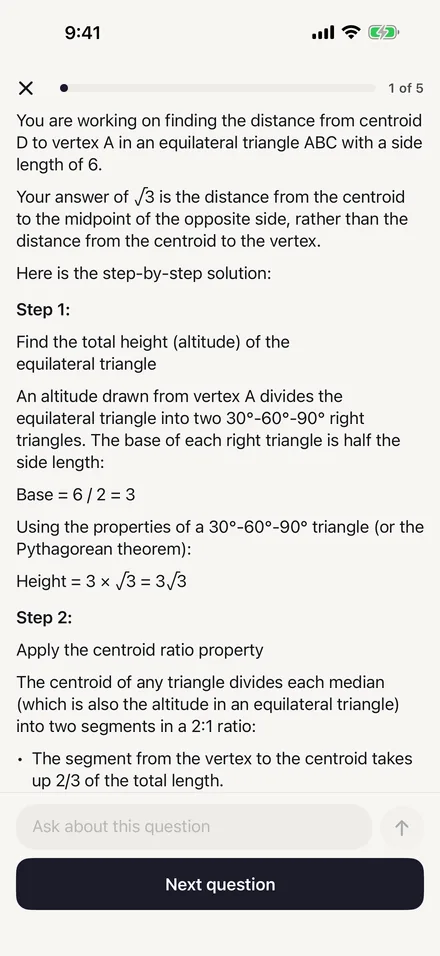
Does every question come with an explanation? Yes. Every question in the app has an explanation of the right answer, shown after you answer. Most walk through the reasoning step by step, and a few are a single short line. If an explanation leaves you stuck, you can ask the AI Tutor about that exact question. AI Tutor
How do the practice tests work? The full format has 98 questions in four timed modules: two Reading & Writing modules of 27 questions and 32 minutes, and two Math modules of 22 questions and 35 minutes. The short format has 44 questions in four modules and takes about 56 minutes. Each test ends with a results screen. Practice tests
Does the second module change based on how I did in the first? No. On the real Digital SAT, your first module decides how hard the second one is. In this app the second module does not depend on your first-module results, so treat a practice test as timed practice with the real question counts and timing. For practice with that routing, use the free full-length tests in Bluebook. Compare options
How accurate is the score estimate? It is an estimate from your practice in the app, not a College Board score. Premium shows a range on the 400 to 1600 scale, worked out from your accuracy, and it updates after every session. With only one or two sessions the range is wider, plus or minus 150 points, and it narrows to about 100 once you have done more. How scores work
How does the Mistake Notebook work? With Premium, every question you miss goes into the Mistake Notebook and comes back for review a day later. Get it right and it returns after 3 days, then after 7 days, and a third correct answer clears it. Miss it again and it starts over the next day. Features
Can I choose how hard the questions are? By default, practice follows your answers: three correct in a row moves you up a level, and two misses in a row moves you down. With Premium you can instead fix the level at Easy, Medium or Hard in Settings, and also set session length, a daily goal and a per-question timer. Compare Free and Premium
What is in the flashcards? There are 2,182 flashcards. About 1,000 are vocabulary, and the rest cover grammar and Standard English, math formulas and concepts across algebra, advanced math, geometry and data, reading, transitions and test strategy. Free users get a 10-card session a day, and Premium has no daily flashcard limit. Features
Can I take practice tests with extended time? Yes. When you set up a practice test you can pick standard time, time and a half, or double time, and the module timers change to match. This helps if you have, or are applying for, testing accommodations and want to practice at the pace you will have on test day. Practice tests
Does the app include the Desmos calculator? No. On test day, Bluebook gives you a reference sheet and the Desmos graphing calculator, and the app's practice tests do not include either one. Keep your own calculator or Desmos handy when you practice Math, and use Bluebook's free practice tests to get used to the built-in tools. Compare options
Does the app have fill-in (type-in) Math questions? No. Every question in the app is multiple choice with four answer choices. On the real Digital SAT, about a quarter of Math questions ask you to type in your own answer, so practice those in the free full-length tests in Bluebook, the College Board's app. Compare options
AI Tutor and AI features
Does the app have an AI tutor for the SAT? Yes. The AI Tutor answers questions about a practice question you just answered, or about any SAT topic, and you can ask follow-up questions. It stays on SAT topics, and for a calculus question it explains that the Digital SAT does not test calculus and offers the closest SAT skill instead. Free users get 3 messages a day. AI features
Which AI does the app use? The AI Tutor, the AI College Counselor and Scan & Solve use Google Gemini, with Anthropic Claude as a backup. Requests go through our own server, which runs on Cloudflare. The app asks before it sends anything of yours for the first time, and your name, email address and a device identifier are not included. Privacy
Can the AI Tutor get things wrong? Yes. AI answers can contain mistakes, and the app reminds you to check anything important with a teacher. Use the tutor to understand a step, then compare what it says with the question's written explanation, and ask a follow-up question when the two do not seem to agree. AI features
Can I scan a question from my SAT book? Yes, with Premium. Scan & Solve takes a photo of an SAT-style question from a book or worksheet and returns a full worked solution, answer included, for up to 30 scans a day. A photo that does not show an SAT question gets a short note instead. The photo is sent to the AI providers, and the app asks first. Features
What does the AI College Counselor do? The AI College Counselor helps with school lists, essays, deadlines and financial aid questions. It uses the app's College Scorecard figures for colleges you name and a short study summary, such as your score estimate and goal score. It shares the free 3-message daily pool with the AI Tutor, and Premium has no daily cap. Features
Where does the college data come from? College Match and the College Counselor use the U.S. Department of Education College Scorecard, data file of June 10, 2026, which reports fall 2024 admissions, for 1,000+ U.S. colleges. Admit rates and SAT ranges appear where a college reports them. Admissions figures change every year, so check each college's own website before you apply. Facts
Privacy and safety
What data does the app collect? Your practice history, scores, streaks, Mistake Notebook, flashcard progress and settings are stored on your device, with no account. When you use an AI feature, what you ask is sent to Google Gemini, with Claude as a backup, through our server, which does not store its content. Your name, email and device identifier are not included. Privacy
Does the app track me for advertising? The app uses Tenjin to measure which of our own ads lead to installs and subscriptions. It connects to Tenjin only if you allow tracking when iOS asks and, on iOS 26 or later, the age range shared with Apple is 18 or over. Otherwise nothing about you goes to Tenjin, and the app works the same either way. Privacy
Can I stop the app from sending my questions to AI? Yes. The app asks before it sends anything of yours to an AI provider for the first time, and you can say not now. You can also turn off Share questions with AI providers in the app's Settings at any time. Practice questions, flashcards and practice tests keep working without it. Privacy
How do I delete my data? You can reset your practice history, score estimate, Mistake Notebook, flashcards, streak or study plan, or reset everything, in the app's Settings. Deleting the app also deletes your study data. A few small records stay in the device's Keychain, such as when the app first ran on that device and a random purchase token. Privacy
For parents
Is the app safe for my teenager? The app has no ads and no account to create. The AI Tutor stays on SAT topics and redirects other requests without calling the AI. If a student writes about self-harm, abuse or danger, the app shows crisis resources such as the 988 Lifeline on the device instead of sending the message to the AI. For parents Privacy
What age is the app for? The app is for students 13 and older and is rated 13+ on the App Store. It is written for students preparing for the SAT, who are usually 14 or older. If your student is under 18, the Terms of Use ask a parent or legal guardian to review and agree to them on the student's behalf. Terms For parents
Can my teen subscribe without my permission? If your family uses Apple's Ask to Buy, a subscription your teen starts waits for your approval, and the app shows that the purchase is waiting for a parent or guardian. All payments and cancellations go through Apple, using the Apple Account on the device, so you can manage them in Settings under Subscriptions. Pricing For parents
Technical help
Does the app work without internet? Partly. The questions, explanations and flashcards are stored in the app itself. The AI Tutor, the AI College Counselor and Scan & Solve need an internet connection, because they send your request to the AI providers. If you often study offline, plan on practice and flashcards; the AI features wait until you are back online. Support
The AI Tutor isn't answering. What should I do? First check that your device is online over Wi-Fi or cellular data, since the AI features need a connection. If you are a free user, you may have used today's 3 messages. AI help can also pause for everyone when demand is very high, so wait a few minutes and try again. Support
Why did my study streak reset? A streak counts days on which you finish at least one practice session, by your device's local date. Miss a day and it goes back to zero, unless you have a streak freeze. You earn a freeze each time your streak reaches a multiple of 7 days, up to 3, and one is used automatically for a missed day. Support
How do I contact support? Email support@devappsai.com. Include your device model, your iOS version and a short description of what happened, so we can help you faster. For billing questions such as refunds, Apple handles payments, so start at reportaproblem.apple.com. Support
Start with five questions.
Download the app free, answer five questions, and read why each answer is right. Premium is there when you want more.