For parents: what you are paying for
Your teen’s SAT prep from start to finish, in one app. Free to start. Premium is $79.99 a year, about 22¢ a day, or $12.99 a month (U.S. App Store).
- 6,000+ SAT-style questions in Math and Reading and Writing
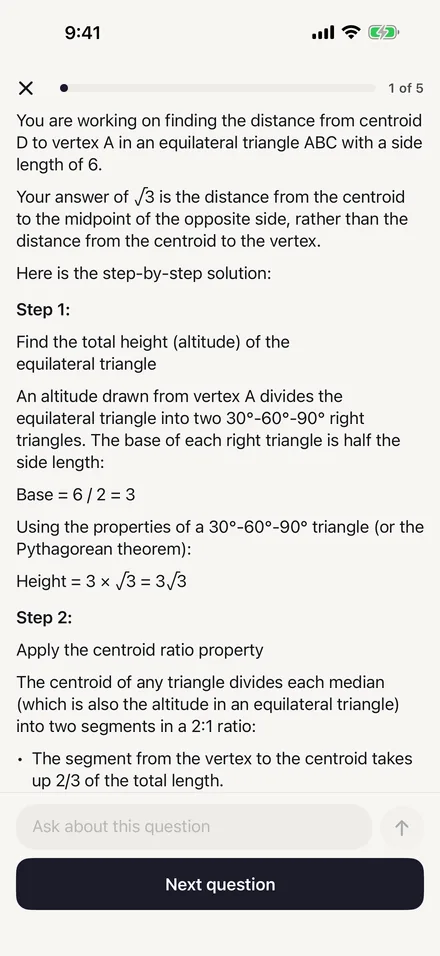
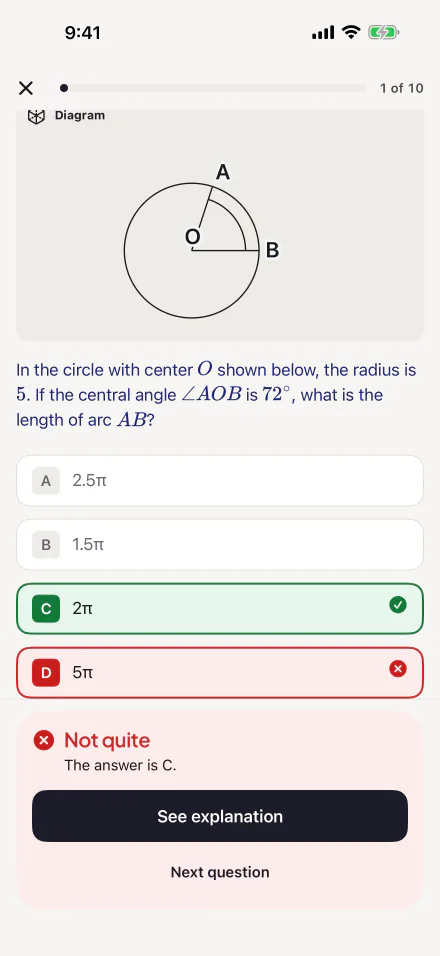
- An explanation for every question
- AI Tutor for follow-up questions
- Full-length and short timed practice tests
- A study plan to the test date
- Score estimate on the 400 to 1600 scale
- Mistake Notebook that brings misses back
- 2,182 flashcards
- Scan & Solve for book and worksheet questions
- College Match from 1,000+ U.S. colleges
- AI College Counselor


Scan the code with your teen’s iPhone, or send them this page.Open this page on your teen’s iPhone and tap Download on the App Store, or send them the link.
Setting it up takes a minute
Install it on your teen’s phone
On your teen’s iPhone, tap Download on the App Store or scan the code above, or send them this page. There is no account to create.
Start with the free daily practice
One 5-question session a day in Math and one in Reading and Writing, 10 flashcards and 3 AI messages, with no payment.
Upgrade from inside the app
When your teen wants more, they choose Premium in the app. If Ask to Buy is on in Family Sharing, the request comes to you to approve.
How to tell if it is working
We do not publish score-gain claims, because we have no measured results to show you. Here is a fair way to check for yourself:
- Before starting, have your teen take a free full-length practice test in Bluebook, the College Board’s own app.
- Practice in this app for a few weeks.
- Take another Bluebook practice test and compare the two scores.
The app’s own score estimate (Premium) is a range from practice accuracy. It is a guide for practice, not an official score.
What your teen gets
Every feature in the app, and whether it is free or needs Premium. See each one on screen.
A bank of 6,000+ SAT-style questions
Math and Reading and Writing, across all eight Digital SAT content domains, in Easy, Medium and Hard.
Free: one 5-question session a day per subject Premium: no daily limitAn explanation for every question
Answer, then see the right choice and why it is right. Explanations are stored in the app.
Free and PremiumAI Tutor
After answering, your teen can ask about that exact question in their own words. The tutor works through it step by step and stays on SAT topics.
Free: 3 AI messages a day Premium: no daily cap, fair use appliesTimed practice tests
The full format has 98 questions in four timed modules, two of Reading and Writing and two of Math. The short format has 44 questions and takes about 56 minutes.
Free: one practice test Premium: more tests in both formatsA starting check
Ten questions, five Math and five Reading and Writing, show where your teen starts. It can be skipped.
Free and PremiumA study plan to the test date
Set the SAT date and a goal score. The plan splits the days into weeks and shows what to practice today.
PremiumScore estimate
A range on the 400 to 1600 scale, based on practice accuracy and updated after every session. It is a guide for practice, not a College Board score.
PremiumWeakest topics
Accuracy by topic, lowest first. One tap starts practice on the weakest ones.
Free: accuracy by subject Premium: by topicMistake Notebook
Every missed question is saved by topic and comes back after 1, 3 and 7 days.
Premium2,182 flashcards
Vocabulary, grammar, math formulas and test strategy.
Free: 10 cards a day Premium: no daily limitScan & Solve
Take a photo of a question from a book or worksheet and get a step-by-step solution from the AI. Up to 30 scans a day.
PremiumCollege Match
Safety, Match and Reach lists from 1,000+ U.S. colleges, with admit rates and SAT ranges where a college reports them (College Scorecard, fall 2024 admissions).
PremiumAI College Counselor
Help with school lists, essays, deadlines and financial aid.
Free: shares the 3 AI messages a day Premium: no daily cap, fair use applies
Privacy and safety
No account, no ads
There is no sign-up, and the app never asks for a name, email or phone number. There are no ads in the app.
Progress stays on the phone
Practice history, scores, goals and settings are stored on the device. Reset All Data in Settings erases them, and deleting the app removes them.
AI with limits
The app asks before it sends a question to an AI provider, and you can switch that off in Settings. The AI never receives a name, email or device identifier. Our server does not store what is asked.
Our own ads
We measure which of our ads lead to installs. A measurement service (Tenjin) runs only for adults who allow tracking; for everyone else, Apple counts an install without identifying anyone. The app works the same either way.
Age
For students 13 and older. Under 18, a parent or guardian reviews and agrees to the Terms of Use.
AI can be wrong
AI answers can contain mistakes, so the app asks students to check anything important with a teacher.
What it costs
22¢ a day (annual plan)
The annual plan is $79.99 a year. Or $12.99 a month. The free tier never expires.
Which plan
Test six months away or less? The monthly plan costs less: two months is $25.98. For a longer runway or a retake, the yearly plan is cheaper. For comparison, one hour of The Princeton Review’s private SAT tutoring is $175 (November 7, 2026).
How billing works
Apple handles every payment. If your Apple Account is eligible, Premium starts with a 7-day free trial; the subscription screen shows whether it applies. Cancel in Settings › your name › Subscriptions at least 24 hours before the trial or the paid period ends to stop the renewal.
Refunds
Refund requests go through Apple at reportaproblem.apple.com.
Parents ask
Is the app safe for my teenager? The app has no ads and no account to create. The AI Tutor stays on SAT topics and redirects other requests without calling the AI. If a student writes about self-harm, abuse or danger, the app shows crisis resources such as the 988 Lifeline on the device instead of sending the message to the AI. For parents Privacy
What age is the app for? The app is for students 13 and older and is rated 13+ on the App Store. It is written for students preparing for the SAT, who are usually 14 or older. If your student is under 18, the Terms of Use ask a parent or legal guardian to review and agree to them on the student's behalf. Terms For parents
Can my teen subscribe without my permission? If your family uses Apple's Ask to Buy, a subscription your teen starts waits for your approval, and the app shows that the purchase is waiting for a parent or guardian. All payments and cancellations go through Apple, using the Apple Account on the device, so you can manage them in Settings under Subscriptions. Pricing For parents
What data does the app collect? Your practice history, scores, streaks, Mistake Notebook, flashcard progress and settings are stored on your device, with no account. When you use an AI feature, what you ask is sent to Google Gemini, with Claude as a backup, through our server, which does not store its content. Your name, email and device identifier are not included. Privacy
Does the app track me for advertising? The app uses Tenjin to measure which of our own ads lead to installs and subscriptions. It connects to Tenjin only if you allow tracking when iOS asks and, on iOS 26 or later, the age range shared with Apple is 18 or over. Otherwise nothing about you goes to Tenjin, and the app works the same either way. Privacy
Can I stop the app from sending my questions to AI? Yes. The app asks before it sends anything of yours to an AI provider for the first time, and you can say not now. You can also turn off Share questions with AI providers in the app's Settings at any time. Practice questions, flashcards and practice tests keep working without it. Privacy
Can the AI Tutor get things wrong? Yes. AI answers can contain mistakes, and the app reminds you to check anything important with a teacher. Use the tutor to understand a step, then compare what it says with the question's written explanation, and ask a follow-up question when the two do not seem to agree. AI features
How do I cancel my subscription? Subscriptions are managed by Apple. On your iPhone or iPad, open Settings, tap your name, tap Subscriptions, choose NextGen AI SAT Prep and tap Cancel Subscription. Cancel at least 24 hours before the current period ends to stop the next renewal. You keep Premium until the end of the period you already paid for. Support
How do I get a refund? Payments go through Apple, so refunds are requested from Apple, not from us. Go to reportaproblem.apple.com, sign in with your Apple Account, find the NextGen AI SAT Prep charge and submit a request. Apple reviews it and lets you know. Canceling stops future renewals but does not refund time already paid. Support
How do I delete my data? You can reset your practice history, score estimate, Mistake Notebook, flashcards, streak or study plan, or reset everything, in the app's Settings. Deleting the app also deletes your study data. A few small records stay in the device's Keychain, such as when the app first ran on that device and a random purchase token. Privacy
Start with five questions.
Download the app free, answer five questions, and read why each answer is right. Premium is there when you want more.